Guide 6 of 8 · Lab · 6 steps
The price is on the button, and the ceiling
In the Lab every paid button carries its estimate, and the project budget refuses a take that would pass it, before anything is sent.
- At the end
- A take priced before it is sent, a budget that refuses past its ceiling, and a ledger that adds up what was spent.
- Before you start
- A channel open (guide 1).
- To generate for real: a provider connected in Connect. This guide never presses Generate, and nothing in it spends.
Open the Lab
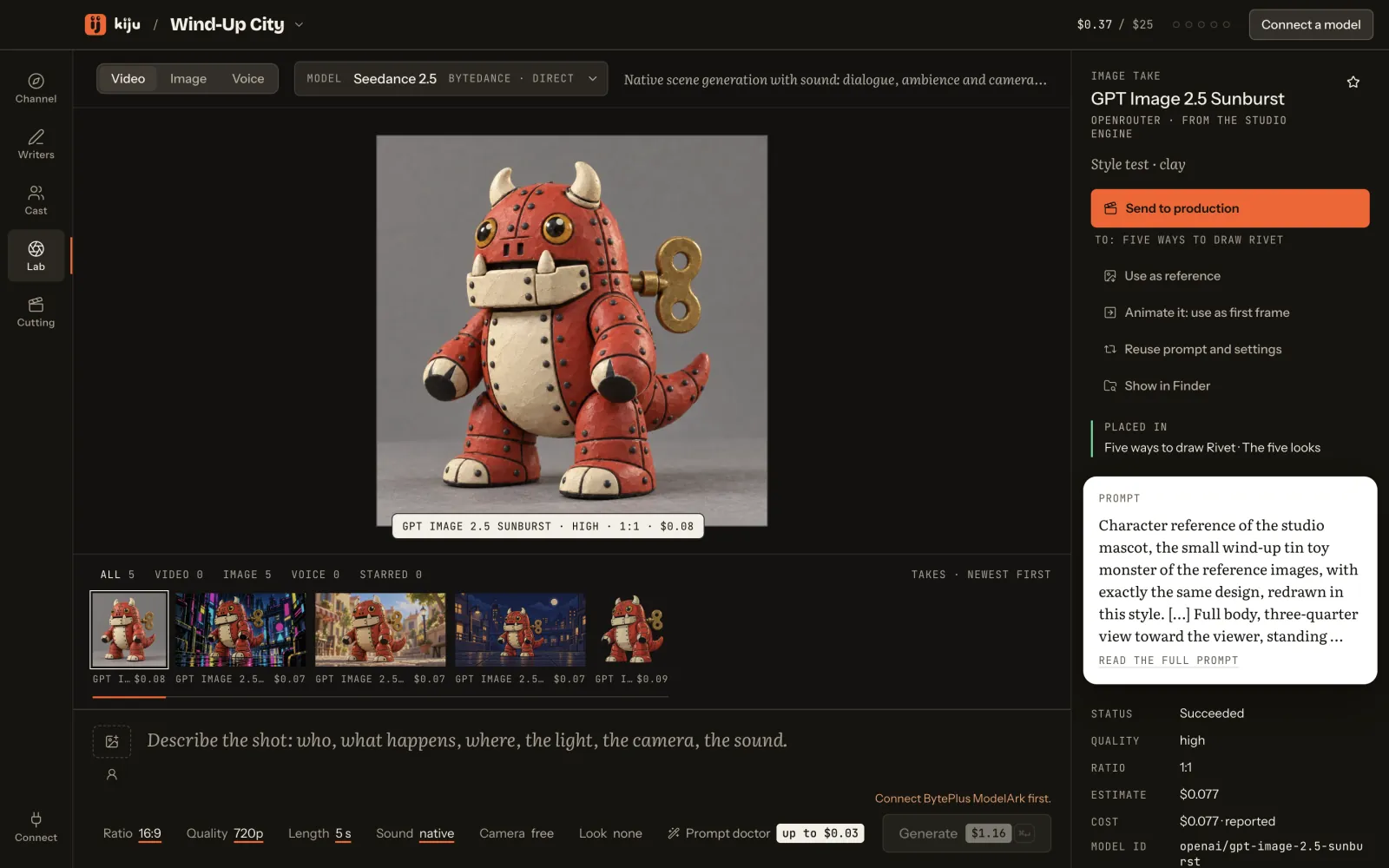
Open the Lab: it is where takes are made. At the top, pick the kind of take (video, image or voice) and the model. The picture sits in the middle, the takes under it, the composer at the bottom.
 (Open the full picture)
Pick a model by its price
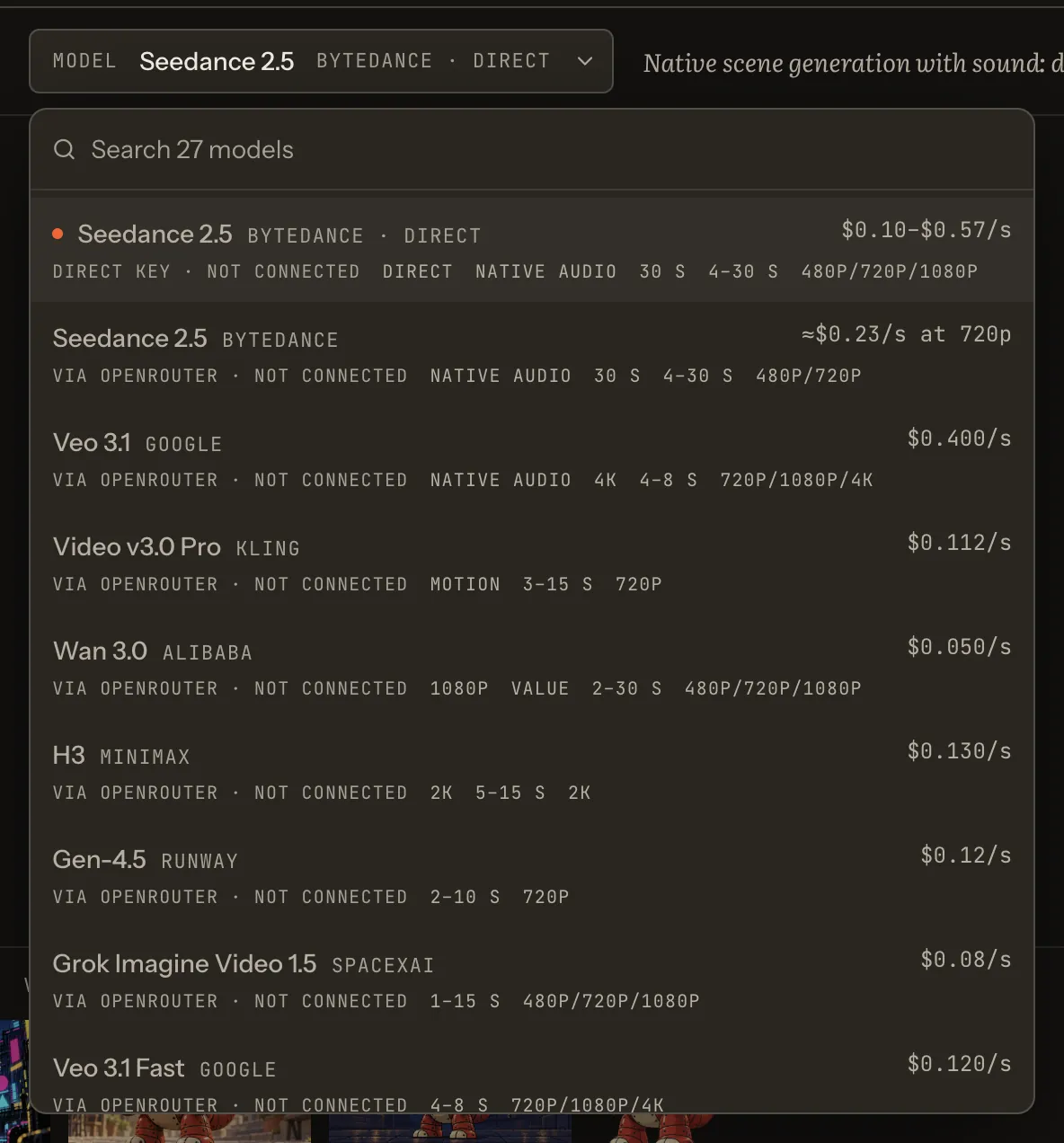
The model button opens the catalogue: the direct models on your BytePlus key (Seedance 2.5, Seedream 5.0 Pro) and OpenRouter’s live catalogue. Each model shows its price (per second for video, per image, per thousand characters for voice), its lengths and resolutions, and whether it is connected.
 (Open the full picture)
Read the button
Describe the shot, then set the quality, the length and the sound in the bar under it. Generate carries the estimate, rounded up to the cent, before anything is sent. Seedance 2.5 direct is priced by the second at each resolution: 5 seconds at 720p read $1.16 on the button; at 480p, $0.52.
 (Open the full picture)
 (Open the full picture)
The price is there even before the provider is connected: the button stays grey and says why (“Connect BytePlus ModelArk first.”).
See what leaves your Mac
Above the button, one line says what will be sent and where: your prompt to the model’s provider, then the reference images, or the verified portrait ids of a real person. Its ⓘ adds that this is an estimate, not an invoice: the provider’s own cost replaces it when it reports one.
The writers’ buttons work the same way, with “up to”: an agent run reserves its worst case before it sends, and its real cost replaces the reservation when it ends.
Set the ceiling
Every channel has a project budget, and a new one starts at $25. On the channel page, the ledger shows it: click the figure, type the new amount, then press Set.
 (Open the full picture)
A take whose estimate would carry the spend past the budget does not start. The button turns grey and says why in one sentence: “Over the project budget: … used. Raise it on the Channel page.” Try it: this bar is priced by the desk’s own code, against the sample channel’s real spend.
Try it hereIllustration
Change the quality and the length, then lower the budget until Generate refuses.
Spent on the sample channel: its five recorded takes.
A new channel starts with a $25 budget. Lower it to see the refusal.
Seedance 2.5 · directBytePlus ModelArk
Your prompt → BytePlus ModelArk (Seedance 2.5)· 5 s · 720p · with sound
Spent $0.37 + this take $1.16 = $1.52, for a budget of $25.00.
An estimate, not an invoice. The provider’s own cost replaces it when it reports one.
Behaves like the desk’s control. This page saves nothing and sends nothing.
The header keeps both figures in sight in every room: spent over budget.
 (Open the full picture)
Read the ledger
The ledger’s spent figure adds the cost each provider reported, or the estimate when none did (counted apart, as “of which estimated”), by provider and by production. Agent runs count too. The line under the ledger says the rule: provider-reported cost where known, the estimate otherwise, and no take starts past the budget.
 (Open the full picture)